There comes a point in every homelab when the charming little collection of machines becomes less a hobby and more a jurisdiction.
A Linux box here, a Windows server there, an old machine that refuses retirement with the grim dignity of a county judge. A Mint workstation in one corner. A Windows Server 2012 R2 box in another, still performing its duties while making clear that it disapproves of modernity. Drives added over the years. Backup folders whose importance grows in direct proportion to how little you want to think about them. Machines with names that made sense at the time and now read like a family tree maintained by Dr. Frankenstein’s probate lawyer.
Problems usually came up unexpectedly. What, exactly, is alive this morning? After logging into six machines to find out what the issue was, digging through a browser dashboard with functions that I forgot, waiting for the service to start, clicking through tabs, and eventually discovering that the one server with the important files has been quietly filling its disk like a bathtub with the faucet left on.
I wanted one view with one daily report, one thing in my inbox that told me whether the machines were up, whether the disks were turning red, whether the backups ran, and whether anything had recently complained, updated, failed, hiccupped, or burst into procedural smoke.
So I built EH Server Report.
The Problem: A Mixed Homelab Has No Natural Center
A small homelab is rarely designed all at once, it accretes. That is the polite word, the less polite word is “mutates.”
Mine includes both Linux and Windows systems. Some are Mint. Some are Ubuntu. Some are Windows 10. Some are Windows Server. Some are newer. Some are older. Some are running quietly. Some have strong opinions about OpenSSH. Some can be reached easily. Some behave as though remote management is a personal insult.
That kind of environment does not naturally produce a single clean status page. Linux has its tools. Windows has its tools. Storage has its own problems. Backups have their own rituals. Logs are everywhere. The result is not one monitoring problem. It is a federation of small annoyances.
Is the server up? Is SSH working? Is the disk full? Did my backups run last night?
Did a machine vanish from the network, or merely refuse to answer questions?
These are not exotic enterprise observability questions. They are household infrastructure questions. They are the questions you ask before coffee, preferably without spelunking through terminals like a raccoon in a duct system.
Why the Existing Tools Felt Too Heavy
There are excellent monitoring tools in the world. Grafana, Prometheus, dashboards, containers. Time-series databases. A whole cathedral of blinking panels and noble machinery.
And for many environments, that’s the answer, but not for my problem. I don’t need a mothership. I need a note slipped under the door that says: “The farm is fine, there are some leaks in the foundation though.”
A dashboard is useful when I intend to go look at it. But that assumes I remember to look which I never did. It assumes the browser tab is open. It assumes I want another surface to check, maintain, secure, back up, and explain to myself six months later. For this use case, the dashboard was wrong.
No dashboard required. No browser tab required. No agent army required. Send me the morning facts.
What I Built
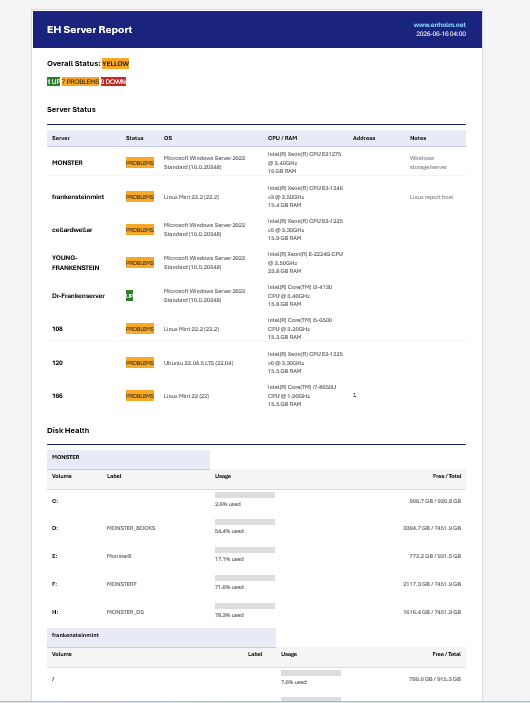
EH Server Report is a Python application that collects basic health information from Linux and Windows machines over SSH, renders the results as an Outlook-safe HTML email, and sends that report daily. The architecture is intentionally plain. There is a server inventory file. There are collectors. There is a renderer. There is an SMTP sender. There are thresholds. There are backup markers. There is a cron job.
The application connects to servers, asks them ordinary questions, normalizes the answers, and then produces a single HTML report. The report is meant to be read, not admired from orbit. It tells me what I need to know and then gets out of the way.
For Linux systems, the collector uses normal shell commands. For Windows systems, it uses PowerShell over SSH. That keeps the design simple: one remote access method wherever possible.
The report includes the basics that matter in a mixed home server environment:
- Whether each server is up, down, or reachable but troubled
- Operating system and version
- CPU and RAM information
- Disk usage with green, yellow, and red visual bars
- Backup freshness based on marker files
- Recent alerts and logged issues
- Manual events, such as planned maintenance or known incidents
This is not an attempt to replace a real observability stack. It is not pretending to be Prometheus in a trench coat. It is a daily operational receipt.
What the Report Shows
The email is designed to answer the morning inspection questions in order. First, it gives the overall status: how many machines are up, how many have problems, and how many are down. Then it shows each server with a clear status badge. Green means up. Yellow means up but needs attention. Red means down or critically broken. This is simple enough to read while half-awake, which is the correct standard for infrastructure reporting.
The disk section is where the report earns its keep. Each disk gets a usage bar. Green is healthy, yellow means watch it, red means stop admiring the problem and do something. The backup section reports whether important folders were backed up recently. This is especially useful for personal projects, writing folders, Obsidian vaults, code directories, and anything else where losing data would produce language unsuitable for family publications. The alert section gives recent issues, failed services, manual events, and warnings. It is not meant to replace full log analysis. It is meant to say, “Something interesting happened here, counselor. You may wish to examine the witness.”
Why Email First Was the Right Design
The most important design decision was not technical. It was behavioral. A dashboard waits for you, an email comes to you. A homelab monitoring system is only useful if it intersects with ordinary life. I already check email. I almost never check a dashboard. I especially do not check a dashboard when things appear to be working, which is precisely when slow failures like disk creep and stale backups do their best work.
An email report is a daily habit without requiring another step. It is passive until it needs attention. It is low ceremony. It works on a phone, laptop, or desktop. It is archived automatically. If something goes wrong over time, there is a trail. A daily HTML report becomes a lightweight history of the environment. Not a metrics database, but enough to answer: When did this start? When did that disk cross into yellow? When did the backup marker stop updating? When did that machine last report cleanly?
Backup status required a practical approach, rather than trying to infer backup success through elaborate filesystem archaeology, the app supports marker files. A backup job writes a timestamp when it succeeds, the app reads that marker and compares its age against configured thresholds.
Installation Overview
The basic installation is intentionally direct.
Clone the repository:
git clone https://github.com/jenholm/eh-server-report.git
cd eh-server-report
Create and activate a virtual environment:
python3 -m venv venv
source venv/bin/activate
Install the dependencies:
pip install -r requirements.txtCopy the example configuration files:
cp config/servers_example.yaml config/servers.yaml
cp config/backups_example.yaml config/backups.yaml
cp config/email_example.env config/email.env
Edit the server inventory, email settings, backup markers, and thresholds for your own environment.
Then run a mock report first. This is the correct first step. Do not begin by wrestling every remote server. First prove the email renders and sends correctly.
python src/main.pyThen run live collection:
python src/main.py --allInclude backups and send the email:
python src/main.py --all --include-backups --sendOnce it works, install the cron job:
bash scripts/install_cron.shWhat This Is and Is Not
EH Server Report is not an enterprise monitoring platform. It is not a replacement for Prometheus, Grafana, Netdata, or a serious alerting stack. If you need long-term metrics, dashboards, service-level objectives, distributed tracing, multi-user access controls, and alert escalation policies, this is not the answer. But if you have a mixed Windows and Linux homelab, and you want one daily email showing what is alive, what is full, what backed up, and what complained, this may be exactly the right size.
EH Server Report is a morning inspection sheet for a small machine kingdom. It asks the servers to account for themselves, prints the facts in color, and sends them where I will actually see them.