Moving enholm.net from HostGator to Hostinger taught me more than I ever wanted to know about web hosting
For years, web hosting occupied a pleasant little corner of my technology budget that I conveniently didn’t think about. I paid somebody a few dollars a month, uploaded a wordpress website, created some email accounts, pointed a domain at it, and thankfully forgot about the machinery. That was my relationship with HostGator and enholm.net.
Then the bill started looking less like web hosting and more like cable television. The hosting plan was one charge, then domain charges was another, then security products appeared. Stuff like backup charges appeared. Finally, I got an email that email charges were going to be monetized independently.
I said enough. The gouge show is over, I might as well own the administrative layer. So we moved enholm.net from HostGator to a VPS. The move turned into a useful case study in what has happened to the web-hosting business.
The Migration Wasn’t Really About Moving Files
At first glance, migrating a LAMP website sounds simple: Copy the Apache/PHP files, run a plugin to transfer the wordpress site, change DNS and your done.
In reality, a commercial hosting account quietly bundles several independent systems together: web hosting, database hosting, DNS, domain registration, SSL certificates, email, backups, and an administrative control panel. During the enholm.net migration, we had to pull those pieces apart and deal with them deliberately rather than treating “the website” as one object. DNS could remain in one place while the server moved to another. Email had to be verified separately. SSL had to be recreated correctly. Backups had to become an explicit system rather than something passed off to the hosting company.
We ultimately built our own automated backup process so the authoritative copies of the site could live under our control rather than being another hosting-company checkbox. This was fairly easy to do with a scheduled service on an old Windows Server box. There was some additional work involved. But there was also something refreshing about it: we could finally see what we were actually paying for.
HestiaCP Instead of cPanel
One of the first decisions was what to use instead of HostGator’s familiar cPanel environment. Technically, Hestia isn’t an operating system. We installed a normal Linux VPS and used HestiaCP, the Hestia Control Panel, as the administrative layer. HestiaCP is open source under the GPL and handles most of the jobs I actually cared about: websites, Apache/NGINX, PHP, databases, DNS, mail, Let’s Encrypt certificates, FTP, firewall management and server administration.
The alternative was paying for cPanel again, but that has stopped making economic sense. cPanel changed its licensing model in 2019 from the traditional server-oriented model to account-based pricing. The change was controversial precisely because high-density hosting servers could suddenly become much more expensive to license. And the increases didn’t stop in 2019. In 2021, cPanel’s Premier tier cost $48.50 per month for up to 100 accounts, with additional accounts billed separately. By 2023, Premier had risen to $59.99. In 2026, the direct-store price is $69.99 per month for 100 accounts, plus $0.49 for every account over 100.
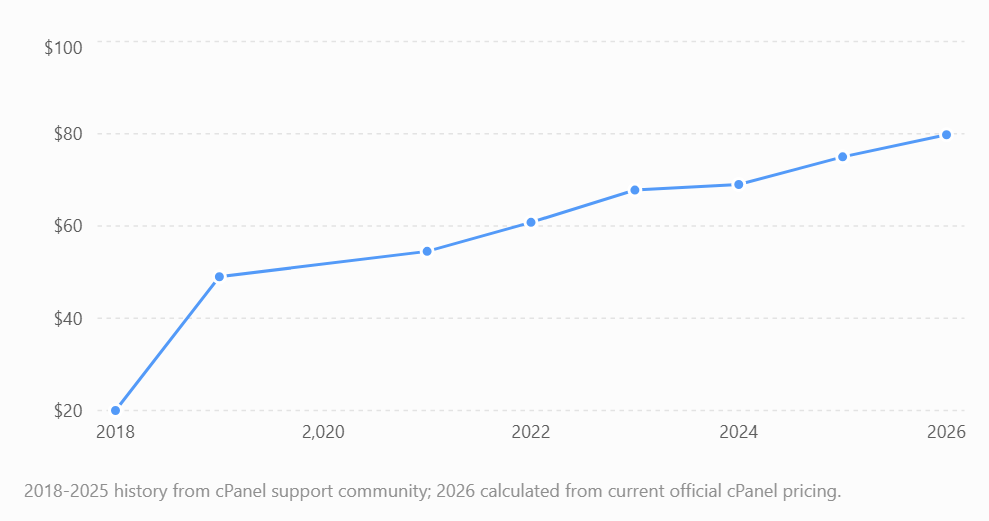
For a representative server with 120 cPanel accounts, historical pricing reported in cPanel’s own support community shows a particularly striking progression. A VPS license that had cost roughly $20 per month before the 2019 restructuring became about $49 under the new model, then $54.50 in 2021, $60.79 in 2022, $67.79 in 2023, $68.99 in 2024 and $74.99 in 2025. Applying cPanel’s official 2026 pricing to the same 120-account server produces $79.79 per month. Tha’s a 299 percent increase from the old $20 VPS license.
Figure 1 below: cPanel cost for a representative 120-account server, 2018-2026. This uses the historical 120-account example reported in cPanel’s support community through 2025, with 2026 calculated from cPanel’s current official Premier price and $0.49-per-account overage.
It gets stranger when you compare software licensing with the server itself. Hostinger currently advertises its KVM 1 VPS at $6.49 per month initially, renewing at $11.99 per month on a two-year renewal. cPanel Solo, which allows one cPanel account, currently costs $29.99 per month. In other words, in that example the control-panel license alone costs about two and a half times as much as the VPS at renewal. HestiaCP costs zero dollars in licensing fees which made the decision fairly easy.
cPanel Isn’t the Whole Problem
It would be convenient to blame everything on cPanel, but that would also be wrong. Hosting companies set their own prices, packaging and renewal policies. cPanel licensing is one pressure on the traditional hosting business, but the larger trend is toward extracting more revenue from each customer after the customer has already moved in. The cheapest price on a hosting company’s front page is increasingly a customer-acquisition price rather than the actual long-term price of hosting a website.
Bluehost (another company I had to let go) currently advertises its Starter plan at $3.99 per month on a 36-month term. It renews at $9.99 per month. HostGator advertises Hatchling at low introductory rates, but its current regular pricing works out to $10.99 per month on a three-year renewal, $13.19 per month on a one-year renewal, or $17.59 if billed monthly.
Figure 2 below: advertised introductory price versus long-term renewal price for three major hosting companies.
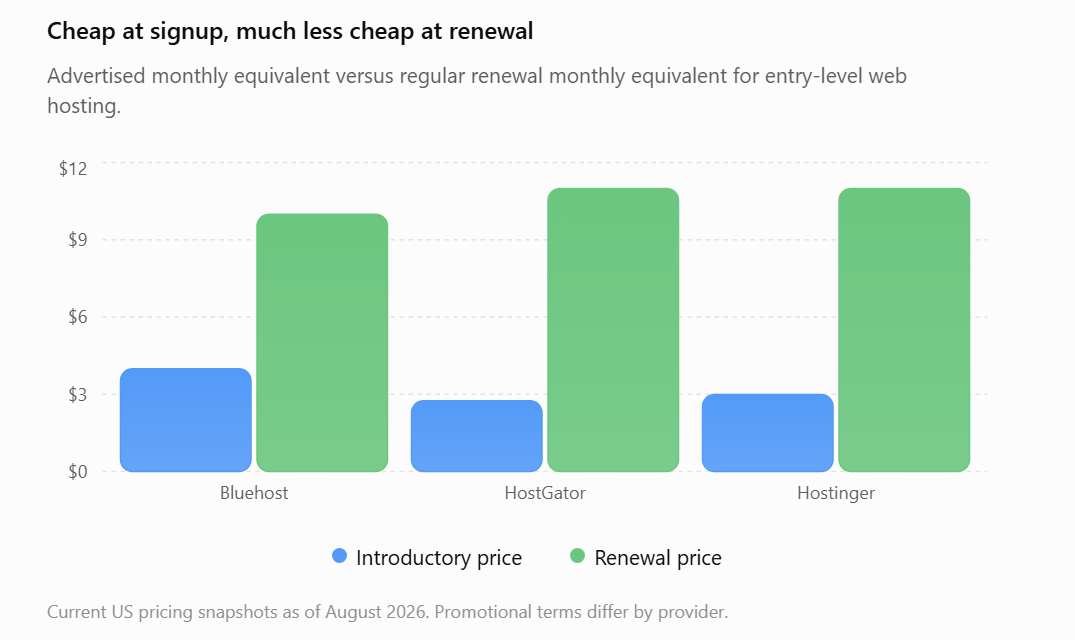
The historical direction is also worth noticing. A 2019 Bluehost review put the Basic plan at $2.95 per month initially and $7.99 after renewal. Today’s Starter plan is $3.99 initially and $9.99 at renewal on the advertised three-year term. A HostGator review covering 2019 through 2022 described Hatchling at $2.75 with renewal around $6.95 per month. HostGator’s own current price sheet puts the comparable long-term regular rate at $10.99 and the one-year rate at $13.19.
The Barnacles
Everything that can attach itself to the base hosting account is the killer, eventually I was paying over $300 a year for a small website and an email address. HostGator’s current add-on sheet is almost a case study by itself. Its regular annual prices include $47.88 for basic CodeGuard backups, $95.88 for SiteLock Essentials, $29.99 for one Professional Email subscription, $14.95 for domain privacy and $9.99 for domain-expiration protection. A .com domain currently renews for another $23.99 per year.
HostGator’s one-year Hatchling renewal at $158.27. Add SiteLock Essentials, CodeGuard Basic, one Professional Email account, a .com renewal and domain privacy. The total becomes about $370.96 per year, or $30.91 per month, which is what I ended up paying.
Bluehost uses many of the same mechanisms. Its current add-on pricing lists SiteLock Essential s at $95.88 per year and domain privacy at $15 per year. Bluehost’s .com renewal is currently $23.99.
Security Is Especially Good for Upselling
Security is a particularly clever category because customers are understandably reluctant to economize when the alternative is described as malware, hackers or losing their website. HostGator’s SiteLock offerings currently run from $95.88 per year for Essentials to $359.88 per year for Prevent Plus. It also lists separate paid SSL products, despite its shared hosting packages already including free SSL certificates. The funniest thing about this was shortly after deploying my wordpress website to Hostgator a few years ago the site got hacked, and the logs said it got hacked through the hostgator server, not through the site.
Your Time vs. Your Money
When we moved enholm.net, we became responsible for things HostGator previously abstracted away. Server updates, mail configuration, DNS mistakes, and backup verification became our problem. But it wasn’t a big problem. Most of these were automated away with scripts and scheduled tasks/chron jobs that were easily written and tested with AI.
The biggest advantage of the Hostinger move wasn’t that Hostinger possesses some secret supply of cheap CPU cycles, it was architectural control and knowledge that I wasn’t going to get another surprise charge on my credit card from some shady fly-by-night cellar dwellar.
We now decide how the web server is configured, how the database is maintained, where the backups live. We run our own mail stack and I’m adding monitoring. We can inspect logs directly. We can build administrative tooling around the server instead of being confined to whatever menu somebody decided belonged in a commercial hosting control panel.
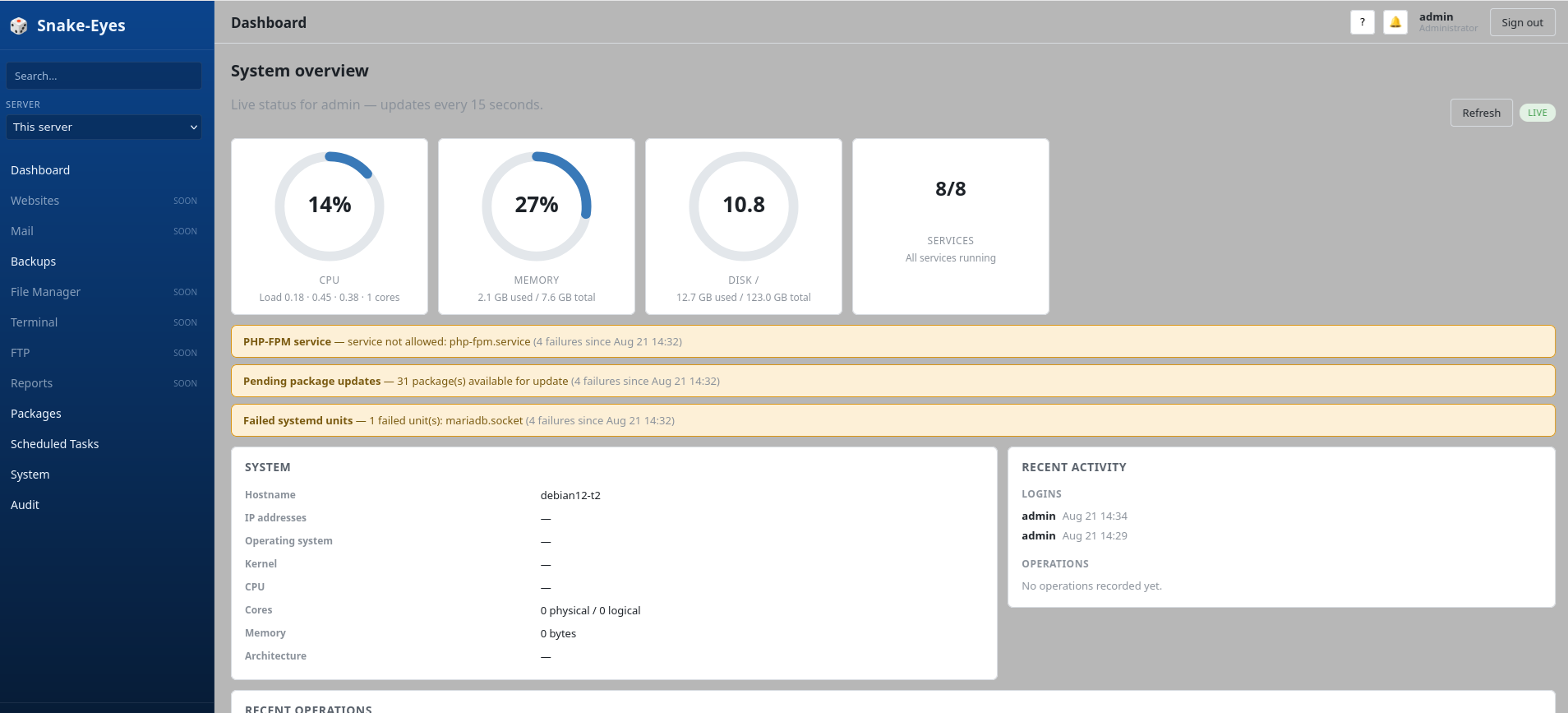
Figure 3. My Snake-Eyes web server monitoring app under construction. Spoiler alert: it’ll cost a lot less than the current favorite.
Heuristics
The experience produced a few useful rules for buying hosting:
- Ignore the introductory price. The renewal price is the real price. Calculate the three-to-five-year cost before buying anything.
- Separate the layers. Domain registration, DNS, web hosting, email, backups and security do not have to come from the same company.
- Free for one year means paid in year two. Put the renewal price into the spreadsheet on day one.
- Treat add-ons as individual purchasing decisions. Don’t buy a $100 security product because a checkout page made an unlocked padlock look frightening.
- Own your backups. A backup controlled exclusively by the company hosting the production server is not enough.
- Control panels are conveniences, not infrastructure. cPanel is good software. That doesn’t mean every server needs a recurring commercial cPanel license.
- If you can administer Linux, price a VPS before renewing shared hosting. The economics have changed enough that the supposedly more sophisticated option may be cheaper.
- Automation changes the make-versus-buy equation. If routine administration can be scripted and AI-assisted, paying perpetual premiums for a friendly control panel becomes harder to justify.